Image to 3D Model AI
Turn a photo into a 3D model or a figurine you can print. Free preview, no sign-up.


Your photo is deleted after 7 days and never used to train AI.
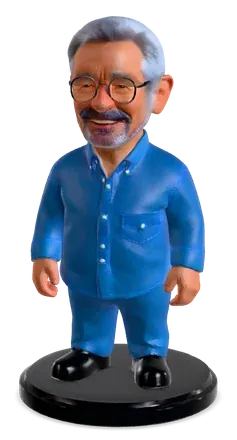
Turn a photo into a figurine
Upload a photo of a person or a pet. We design a collectible figure from it, then make a 3D model you can print and paint.
- Keeps the face, hair and clothes you recognize
- Scaled to the height you choose, ready to print
- A gift for birthdays, weddings and pet lovers
Only use photos of people who agreed to it. The people in these examples were made with AI.


 Friend
 Dog
Dog
 Cat
CatAI image to 3D model examples
Our image to 3D model AI made every model here from one picture. Hover to see the printable shape.


Made for 3D printing
A model can look right on screen and still fail in the slicer. We check yours before you download it.
 Render
Download a print-ready STL
 60.0 mm
- Closed mesh, no holesChecked
- Real size in millimetresYou set it
- A base, if you want one2 mm
- Pieces that float off the bedFlagged
From our own tests in October 2026: 20 photos and drawings made with Standard, and 23 STL files checked in PrusaSlicer 2.9.6.
Printing tips for AI models
- Print figurines standing up, on the base, so the face and front come out smooth.
- Turn on tree or organic supports for ears, tails and outstretched arms. They are easier to remove from curved shapes.
- Use a fine layer height, around 0.12 to 0.16 mm on an FDM printer, for faces and fur.
- Go a little bigger than you think. Details hold up better at 60 mm and taller on FDM printers; resin printers can go smaller.
- Check the preview in your slicer before you print. If a part floats or looks thin, regenerate from a clearer photo rather than fixing it by hand.
The format you need. STL for PrusaSlicer, Bambu Studio and other slicers. GLB for the web, AR and game engines. OBJ for editing in Blender. STL files print in one color. Multicolor 3MF is not available yet.
How to turn an image into a 3D model with AI
- Upload a photo.
JPG, PNG or WebP, up to 10 MB. One subject, fully in frame, works best.
- Pick 3D model or figurine.
- Quick: free, a fast first look.
- Standard: a colored model with clean geometry, made with Rodin Gen-2.5 Fast. Your first Standard model each day is free; after that it costs 2 credits.
- Detailed: the finest surface detail, made with TRELLIS 2, 6 credits.
- Preview, then download.
Rotate it, check the printable shape and set the height in millimetres. Downloads come with any paid plan or a Credit Pack.


 90 mm
90 mmPhotos that work


What goes wrong, from our tests


Limitations
- The back is a guess. One photo shows one side. The AI fills in what it cannot see, so a hidden logo or pattern will not appear.
- Not for precise parts. Sizes are exact, but shapes are interpreted. Do not use the results for brackets, threads or anything that must fit.
- Thin and see-through things come out thick, solid or missing.
- Colors are for the preview. STL prints in one color, and colors can come out lighter than the photo.
- Detailed models have no STL yet. Use Standard if you want to print.
- Free results are preview-only and are kept for 7 days.
- Photos of real people need that person's consent. Some images are blocked by our content checks.
Pick the quality you need
You see the credits before you generate. Failed generations are refunded.
Free first look
The shape in under a minute.
SAM 3D, freeColored, print-ready
Watertight STL. Free once a day.
Rodin Gen-2.5 Fast, 2 creditsFine surface
GLB and OBJ for now, no STL yet.
TRELLIS 2, 6 creditsSharpest for painting
More faces for sharper details.
Rodin Gen-2.5, 8 credits
Pricing
Preview for free. Pay when you want the files.
100 credits a month, about 50 Standard models. Downloads and commercial use.
Start Starter250 credits a month, High detail quality and 3 models at a time.
Start Pro600 credits a month for up to 3 people, on one bill. Set up by hand for now.
Contact usFAQ
Can AI create a 3D model from a photo?
Yes. Photo to 3D model is exactly what an image to 3D model AI does: it builds a full 3D model from one photo, including the sides it cannot see. A single clear photo of one object works best.
Is there a free AI 3D model maker?
Yes. Hooray3D is a free image to 3D model AI: you get 2 free previews a day without signing up, one in Standard quality and one in Quick. Free results can be viewed and rotated online. Downloading needs a Credit Pack or a paid plan.
Can I make a figurine of someone?
Yes, if they agreed to it. Upload a clear photo, pick Figurine, and you get a collectible figure you can print. Please don't upload photos of famous people.
Can I 3D print the result?
Yes. Standard models download as a watertight STL scaled to the height you choose, with an optional base. Open it in PrusaSlicer, Bambu Studio or any other slicer. STL prints in one color.
How long does it take?
Usually under a minute for Quick and Standard. Detailed takes about two to three minutes. You can leave the page open and come back.
Which file formats can I download?
STL for printing, GLB for the web, AR and game engines, and OBJ for editing. Detailed models are available as GLB and OBJ for now.
Is my image private?
Yes. Your image is processed in the cloud only to make your model, deleted after 7 days and never used to train AI models.
What happens if a generation fails?
Nothing is charged. A failed or timed-out generation gives back your free preview or credits automatically.
Can I use the models commercially?
Yes, for models you download with a paid plan or Credit Pack. You must own the rights to the photo you upload.
Who runs Hooray3D?
It is an independent product. Write to support@hooray3d.com with any question about your models or your bill.
More free tools for 3D printing


Your photo, ready to print.
Create a 3D model free